Website Maintenance for Small Businesses: What to Do Monthly, Quarterly, and Yearly
Launching your website is a milestone, but it is not the finish line. A website that is not maintained will slowly degrade. Pages break, plugins become vulnerable, content goes stale, and performance drops. Within a year, an unmaintained site can go from a professional asset to an embarrassing liability that actually drives customers away.
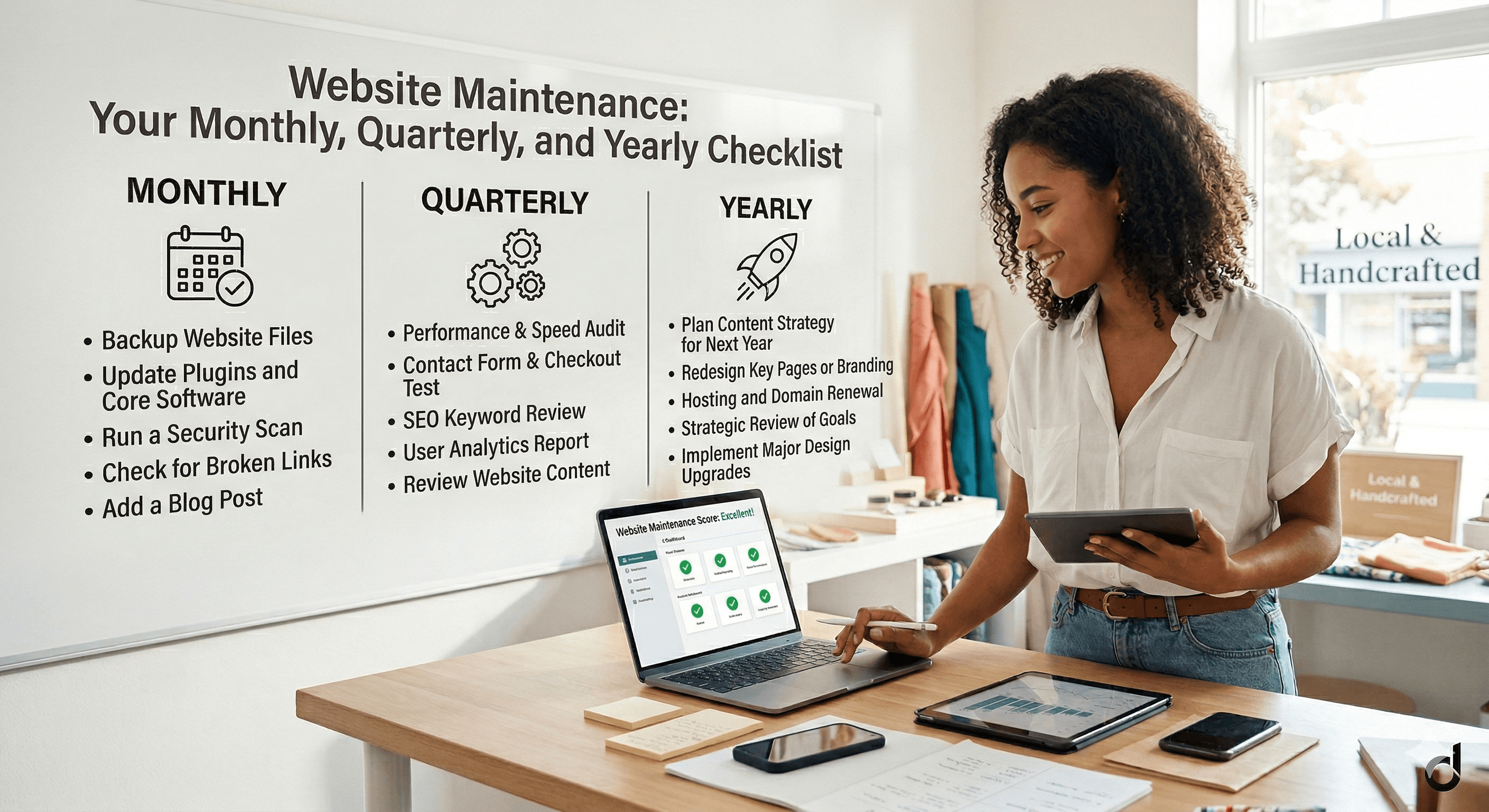
The good news is that website maintenance does not have to be overwhelming. By organizing tasks into monthly, quarterly, and yearly routines, you can keep your site fast, secure, and effective in just a few hours per month. This guide gives you a complete maintenance schedule you can start using today.
Why Website Maintenance Matters
Think of your website like a physical storefront. You would not leave broken lights, outdated signs, and a jammed front door for months without fixing them. Your website deserves the same attention.
Unmaintained websites create three serious problems. First, they become security risks. Outdated software, expired SSL certificates, and unpatched plugins create vulnerabilities that hackers exploit daily. Small business websites are frequent targets because attackers know they are often neglected. For a deeper look at the threats facing small business sites, read our guide on website security for small businesses.
Second, unmaintained sites get slower over time. Database bloat, unoptimized images, broken scripts, and outdated caching configurations all contribute to creeping load times. And slow websites cost real money. Research consistently shows that even a one-second delay in page load time can reduce conversions by 7% or more. Our article on how slow websites cost small businesses millions breaks down exactly how speed affects your bottom line.
Third, stale content hurts your search rankings and your credibility. If your site still lists last year's holiday hours or promotes a service you no longer offer, visitors will question whether you are still in business at all.
Monthly Maintenance Tasks
These are the tasks you should complete every month. They take about two to three hours total and keep the most critical aspects of your site in good shape.
Software and Plugin Updates
If you are running WordPress or another CMS, check for updates to your core software, theme, and all plugins. Updates fix security vulnerabilities, improve performance, and add features. Before applying updates, make sure you have a current backup. Then update one item at a time and check your site after each update to catch any conflicts early.
For website builder platforms like Squarespace or Wix, updates are handled automatically. But you should still check that your site looks and functions correctly after platform updates roll out, especially if you use custom code or third-party integrations.
Backup Verification
Your hosting provider or backup plugin should be creating automatic backups. Monthly, verify that backups are actually running and that the backup files are complete and accessible. Download a backup file and confirm it is not corrupted. There is nothing worse than discovering your backups failed when you actually need to restore your site.
Performance Check
Run your homepage and two or three key pages through Google PageSpeed Insights (pagespeed.web.dev). Note your scores and any new issues flagged. If scores have dropped since last month, investigate the cause. Common culprits include new images that were not optimized, a plugin or script that was added, or a caching configuration that changed.
Broken Link Scan
Use a free tool like Broken Link Checker or Screaming Frog (free for up to 500 URLs) to scan your site for broken links. Fix or remove any links that return 404 errors. Broken links frustrate visitors and send negative signals to search engines.
Form and Functionality Testing
Submit a test entry through every form on your site (contact forms, newsletter signups, quote request forms). Make sure the submissions arrive in your inbox and any autoresponders fire correctly. Also test your checkout process if you sell online, your appointment booking system, and any chat widgets or integrations.
Content Review
Review your homepage and top-performing pages for accuracy. Update any outdated information: hours, pricing, team members, phone numbers, addresses. If you have a blog, publish at least one new post or update an existing one with current information.
Quarterly Maintenance Tasks
Every three months, set aside a half day for these deeper maintenance tasks. They address issues that accumulate gradually and are easy to miss in monthly checks.
Security Audit
Go beyond basic updates and do a more thorough security review. Check that your SSL certificate is valid and not approaching expiration. Review your user accounts and remove any that are no longer needed. Check file permissions on your server. Scan your site with a security tool like Sucuri SiteCheck or Wordfence (for WordPress) to check for malware or vulnerabilities.
Your SSL certificate is one of the most important security and trust signals on your site. If you are not sure why it matters or how it works, our explanation of SSL certificates and why your site needs HTTPS covers everything you need to know.
SEO Health Check
Review your Google Search Console account for any new errors or warnings. Check for crawl errors, mobile usability issues, and manual actions. Look at your search performance data to see if any important keywords have dropped in rankings. Review your sitemap to make sure all important pages are included and no orphan pages exist.
Image and Media Audit
Over time, websites accumulate unused images, oversized files, and media that was uploaded but never published. Clean up your media library by removing unused files and compressing any images that are larger than necessary. Large images are one of the most common causes of slow page loads.
Analytics Review
Pull up your Google Analytics data and compare the current quarter to the previous one. Look at overall traffic trends, your top-performing pages, bounce rates, conversion rates, and traffic sources. Identify pages that are underperforming and flag them for content updates. Note any traffic drops that might indicate technical issues or lost search rankings.
Plugin and Integration Audit
Review every plugin, extension, or third-party integration on your site. Remove anything you are no longer using. Check that remaining integrations are still working correctly and are still being actively maintained by their developers. Abandoned plugins that stop receiving updates become security risks.
Yearly Maintenance Tasks
Once a year, take a more strategic look at your website. These tasks go beyond keeping things running and focus on ensuring your site still serves your business goals.
Full Content Audit
Review every page on your site. Is the information still accurate? Do the pages still align with your current services, pricing, and business goals? Are there content gaps (topics or services you should be covering but are not)? A content audit often reveals pages that need rewriting, pages that should be merged, and new pages that should be created.
Design and UX Review
Web design trends and user expectations evolve. Compare your site to competitors and to current best practices. Is your site still mobile-friendly (test on current devices, not just the ones available when you launched)? Is your navigation still intuitive? Do your calls to action still stand out? You do not need a full redesign every year, but small design updates keep your site feeling current.
Hosting Evaluation
Review your hosting provider's performance over the past year. Check your uptime records, page load times, and support response times. Compare your current plan's pricing and features to alternatives. If your traffic has grown, you might need to upgrade. If your host has been unreliable, it might be time to switch. For guidance on evaluating hosting options, our guide on how to choose web hosting for small business covers what to look for.
Legal and Compliance Review
Review your privacy policy, terms of service, and cookie consent mechanisms. Laws and regulations change, and your site needs to stay compliant. Check that your privacy policy accurately describes how you collect, use, and store customer data. Update your copyright year in the footer.
Domain and SSL Renewal
Verify that your domain name registration will not expire in the coming year. Enable auto-renewal if you have not already. Confirm your SSL certificate will renew automatically or set a reminder to renew it manually before it expires.
Goal Setting
Review your website analytics against the goals you set at the beginning of the year. Did you hit your targets for traffic, leads, and conversions? Set new goals for the coming year and identify what changes to your site will help you reach them. This yearly goal-setting process ensures your website continues to evolve alongside your business.
How to Delegate Maintenance
Not every business owner has the time or technical confidence to handle all maintenance tasks themselves. You have several options for delegation.
A managed hosting provider handles server-level maintenance, including updates, backups, security monitoring, and performance optimization. This covers a significant portion of the technical tasks on this list. Managed WordPress hosting from providers like SiteGround, Cloudways, or WP Engine typically costs $25 to $100 per month.
A website maintenance service or virtual assistant can handle the full checklist for you. These services typically cost $100 to $500 per month depending on the scope. They handle updates, backups, monitoring, content changes, and monthly reporting.
If you have a team member who is reasonably tech-savvy, you can assign them the monthly tasks using this guide as a checklist. The quarterly and yearly tasks might still benefit from professional support, especially the security audit and hosting evaluation.
For a broader perspective on all the elements that go into running a successful business website, our complete guide to building a small business website covers the full picture from planning through ongoing management.
Building Your Maintenance Routine
The best maintenance routine is one you actually follow. Start by blocking time on your calendar. Schedule two to three hours on the same day each month for your monthly tasks. Add a half-day quarterly review. And set aside a full day once a year for your annual audit and goal setting.
Create a simple checklist (a spreadsheet works fine) and track when each task was last completed. This creates accountability and makes it easy to hand off maintenance to someone else if needed.
Your website is one of your most valuable business assets. Consistent maintenance protects that investment, keeps your customers happy, and ensures your site continues to generate leads and revenue year after year. The few hours you spend each month on maintenance will save you from expensive emergency fixes, lost rankings, and the embarrassment of a broken or outdated online presence.