Data Privacy and Compliance for Small Business Websites
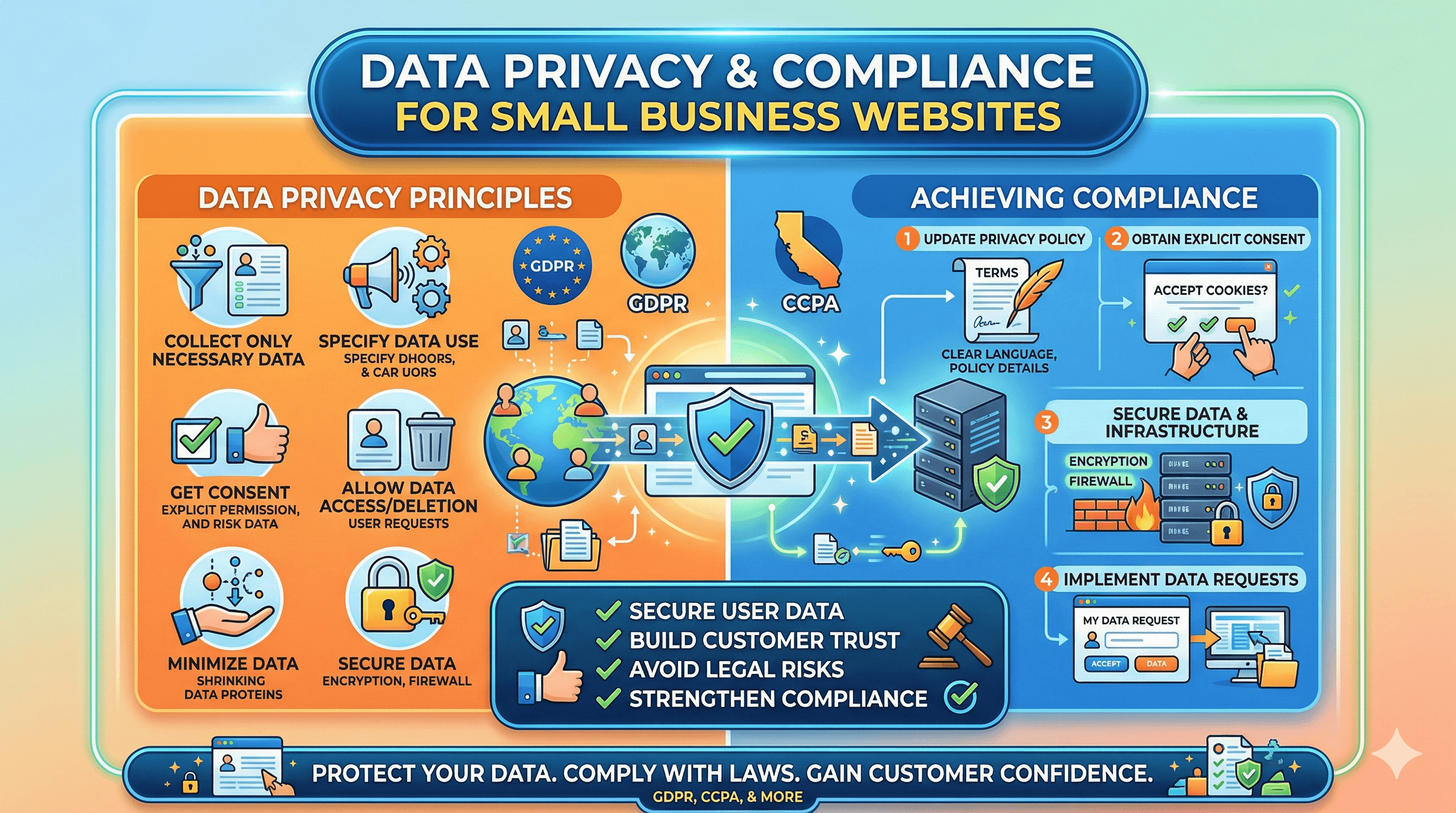
If your website collects any information from visitors (and it almost certainly does), you have legal obligations around how you handle that data. Privacy regulations have expanded significantly in recent years, and they apply to small businesses just as much as large corporations. The penalties for noncompliance can include fines, lawsuits, and lasting damage to your reputation.
The good news is that privacy compliance for a typical small business website is manageable. You do not need a legal team or a six-figure compliance budget. This guide explains the key regulations, what they require, and the practical steps you can take to bring your website into compliance.
Why Data Privacy Matters for Small Businesses
Every time someone visits your website, data is being collected. Google Analytics tracks their behavior. Your contact form captures their name and email. Your email marketing tool stores their preferences. Your e-commerce system records their purchase history and payment details. Even basic cookies and web server logs capture IP addresses and browsing patterns.
This data is valuable to your business, but it comes with responsibility. Customers trust you with their personal information, and violating that trust has consequences beyond legal penalties. A data breach or privacy scandal can destroy customer relationships that took years to build.
Privacy compliance also affects your business relationships. If you work with larger companies or government agencies, they often require vendors and partners to demonstrate privacy compliance. Being able to show that you take data privacy seriously can be a competitive advantage.
And from a practical standpoint, privacy-compliant practices simply make your business more organized. Knowing what data you collect, where it is stored, and who has access to it makes your operations more secure and efficient.
Key Regulations You Need to Know
Several major privacy regulations may apply to your small business, depending on where you operate and where your customers are located.
GDPR (General Data Protection Regulation)
The GDPR is the European Union's privacy law, but it applies to any business that collects data from EU residents, regardless of where the business is located. If someone from the EU visits your website and you collect their data (even through Google Analytics), the GDPR applies to you.
Key GDPR requirements include obtaining clear, affirmative consent before collecting personal data (pre-checked boxes do not count), providing a clear and comprehensive privacy policy, giving users the right to access, correct, and delete their data, reporting data breaches to the relevant authority within 72 hours, and appointing a data protection officer if you process data on a large scale (most small businesses do not meet this threshold).
GDPR fines can reach up to 20 million euros or 4% of annual revenue, whichever is higher. While enforcement against small businesses has been less aggressive than against tech giants, fines for small and mid-size businesses have been increasing.
CCPA/CPRA (California Consumer Privacy Act / California Privacy Rights Act)
California's privacy laws apply to businesses that collect personal information from California residents and meet certain thresholds: annual revenue over $25 million, data from 100,000 or more consumers, or more than 50% of revenue from selling consumer data. Even if you do not meet these thresholds, following CCPA guidelines is good practice because similar laws are being enacted in other states.
Key CCPA requirements include disclosing what personal information you collect and how it is used, giving consumers the right to opt out of the sale of their personal information, providing a "Do Not Sell My Personal Information" link if applicable, and not discriminating against consumers who exercise their privacy rights.
CAN-SPAM Act
The CAN-SPAM Act regulates commercial email in the United States. If you send marketing emails to customers or prospects, you must comply with its requirements: include your physical mailing address in every email, provide a clear and functional unsubscribe mechanism, honor unsubscribe requests within ten business days, use accurate "From" and "Subject" lines, and identify the message as an advertisement if it is one.
Violations can result in penalties of up to $51,744 per email, so compliance with CAN-SPAM is non-negotiable for any business that uses email marketing. For guidance on setting up email marketing the right way, our article on email marketing for small businesses covers platform selection, list building, and compliance basics.
Other State and International Laws
Privacy legislation is expanding rapidly. States including Virginia, Colorado, Connecticut, Utah, Iowa, Indiana, Tennessee, Montana, Texas, and Oregon have enacted their own privacy laws. Internationally, Canada's PIPEDA, Brazil's LGPD, and the UK's post-Brexit version of the GDPR all impose similar requirements. The trend is clear: more jurisdictions are adopting stronger privacy protections, and compliance is only going to become more important.
Creating a Privacy Policy
Every website needs a privacy policy. It is legally required in many jurisdictions and expected by virtually all visitors. Your privacy policy should be written in plain, understandable language (not dense legal jargon) and should cover these topics.
What personal information you collect. Be specific. List the types of data: names, email addresses, phone numbers, IP addresses, cookies, payment information, and any other data your site collects. Explain which data is collected automatically (like cookies and analytics) and which is provided voluntarily (like form submissions).
How you collect that information. Describe the mechanisms: forms, cookies, analytics tools, third-party integrations, and any other collection points on your site.
Why you collect it. Explain the purpose for each type of data. You might collect email addresses to respond to inquiries and send marketing newsletters. You might use analytics data to improve your website's performance and content.
How you store and protect it. Describe the security measures you use to protect personal data. Mention encryption, secure servers, access controls, and any relevant certifications.
Who you share it with. Disclose any third parties that receive your visitors' data. This includes analytics providers (Google), email marketing platforms (Mailchimp, Constant Contact), payment processors (Stripe, PayPal), advertising networks, and any other services that process data on your behalf.
How long you keep it. Specify your data retention periods. Do you delete contact form submissions after a year? Do you keep customer purchase records indefinitely? Be clear about your timelines.
User rights. Explain how users can access, correct, or delete their data. Provide a contact method (email address or form) for privacy-related requests.
You can use a privacy policy generator (Termly, PrivacyPolicies.com, or Iubenda) to create a starting point, then customize it for your specific situation. If your business handles sensitive data (health, financial, or children's information), consult a lawyer to review your policy.
Link to your privacy policy from your website footer so it is accessible from every page. Also link to it from any forms that collect personal information.
Cookie Consent and Management
Cookies are small files that websites store in visitors' browsers to track behavior, remember preferences, and enable functionality. Under the GDPR and similar laws, you must inform visitors about the cookies your site uses and, in many cases, obtain their consent before setting non-essential cookies.
Essential cookies (those required for basic site functionality, like keeping a shopping cart active) do not require consent. But analytics cookies, marketing cookies, and third-party tracking cookies do require consent under the GDPR.
Implement a cookie consent banner that appears when someone first visits your site. The banner should clearly explain what cookies you use and why, offer a way to accept or reject non-essential cookies, link to your full cookie policy or privacy policy, and not set non-essential cookies until consent is given.
Several tools make cookie consent implementation straightforward: Cookiebot, CookieYes, and OneTrust all offer cookie consent solutions with free tiers for small websites. These tools automatically scan your site for cookies, generate a cookie policy, and display a compliant consent banner.
Ensuring your site runs on HTTPS is a foundational security and privacy measure that supports your compliance efforts. Our article on SSL certificates and why your site needs HTTPS explains the connection between encryption and data protection.
Compliance for Forms and Data Collection
Every form on your website is a data collection point that needs to comply with privacy regulations. Your contact forms, newsletter signups, quote request forms, and any other forms that collect personal information all need attention.
For each form, add a brief notice explaining how the submitted information will be used. Something like "We will use this information to respond to your inquiry. See our privacy policy for details." Link to your privacy policy from this notice.
For newsletter signups and marketing email lists, the GDPR requires explicit, opt-in consent. A pre-checked checkbox does not qualify. The user must actively check a box or click a button that clearly indicates they agree to receive marketing communications. Double opt-in (where the user confirms their subscription via email) is the gold standard and is required in some jurisdictions.
If your site has a contact form, make sure you understand where the form submissions are stored and who has access to them. Many form plugins store submissions in your website's database, which means they are subject to the same security and retention requirements as any other personal data. Our guide on how to add a contact form to your website covers form setup, including privacy considerations.
Your Compliance Checklist
Use this checklist to assess and improve your website's privacy compliance.
Audit your data collection. List every way your website collects personal information: forms, analytics, cookies, e-commerce, and third-party integrations. For each collection point, document what data is collected, why it is needed, where it is stored, and who has access.
Create or update your privacy policy. Make sure it accurately describes your current data practices. Link to it from your footer and from every data collection form. Review it at least once a year and update it whenever your practices change.
Implement cookie consent. Install a cookie consent tool that blocks non-essential cookies until the visitor provides consent. Test it to make sure analytics and marketing cookies are not firing before consent is granted.
Review your email marketing compliance. Confirm that your email signup process uses explicit opt-in. Verify that every marketing email includes your physical address and an unsubscribe link. Test your unsubscribe process to make sure it works.
Set up data request handling. Create a process for responding to data access, correction, and deletion requests. Designate someone in your business to handle these requests. Respond within the timeframes required by applicable laws (30 days for GDPR, 45 days for CCPA).
Secure your data. Ensure your website uses HTTPS. Use strong, unique passwords for all accounts that access customer data. Limit access to personal data to only those who need it. For a broader view of website security practices, our website security guide for small businesses covers the full picture.
Document your compliance efforts. Keep records of your data processing activities, consent mechanisms, and policy updates. This documentation is valuable for demonstrating compliance if you are ever audited.
Staying Compliant Over Time
Privacy compliance is not a one-time project. Laws change, your website evolves, and new tools and integrations introduce new data collection points. Build privacy into your regular business processes.
Whenever you add a new tool, plugin, or integration to your website, ask: does this collect personal data? If so, update your privacy policy, add it to your cookie consent tool if applicable, and review the tool's own privacy practices.
Review your privacy policy and data practices at least once a year. Many businesses tie this review to their annual website maintenance schedule.
Stay informed about new privacy legislation in your state and in the jurisdictions where your customers are located. Subscribe to a privacy-focused newsletter or follow a compliance blog so you hear about changes before they take effect.
Privacy compliance may feel like a burden, but it is really about treating your customers' data with the same respect you would want for your own. The businesses that take privacy seriously build deeper trust with their customers, avoid costly legal problems, and position themselves as responsible, professional operations in an era where data misuse makes headlines every week.